

How To Create A Mock Service In Soapui
14.06.2021
On one of our integration projects using the IBM API Connect, we wanted to create a quick mock of our Customer's backend SOAP service. We used quite effectively a SpringBoot a few times in the past but I wondered if it would be faster (or at least more interesting) to use the mocking capabilities of the SoapUI for this purpose 🤔
TLDR;
You can use the prepared Docker image to run mock services created by the SoapUI in the soapui-mockservicerunner image:
docker run --rm -p 8080:8080 -v $PWD/soapui:/home/soapui/project vvidovic/soapui-mockservicerunner:latest -a "/" -p "8080" /home/soapui/project/my-soapui-project.xml Creating mock service in the SoapUI
SoapUI is a great tool with an intuitive GUI that you can use to call and mock
SOAP web services. For example:
- create a new project based on the WSDL
- generate a Mock SOAP service (right-click on the interface in a projects navigator view)
- edit generated responses and/or create new responses
- open and edit the MockOperation
- select the appropriate Dispatch method (XPATH, SCRIPT, RANDOM, SEQUENCE, QUERY_MATCH)
- for example, you can select the response based on the XPath result of the request received
For more details about the SoapUI mocking features, please check SOAP Service Mocking Overview.
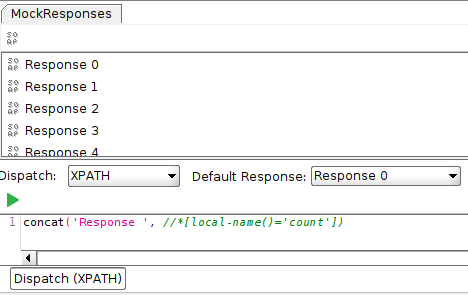
SoapUI mock operation response selection using XPath
Running the created mock service from the command line
SoapUI doesn't stop with the GUI for your mocking needs. It have a command-line `mockservicerunner.sh` script which can be used to run your SOAP mock service without the UI.
The process to use it is quite simple:
- create a mock service using the GUI
- run a mock service using the provided script `mockservicerunner.sh`
For example:
./mockservicerunner.sh -a '/' -p 8080 my-soapui-project.xml - `-a`: the local path to listen on
- `-p`: the local port to listen on
For more information about how to run your mock services from the command line, please check the SoapUI Test Automation documentation.

And now,.. creating a mock service from a Docker container
Running the created mock service as a Docker container
I tried to find out if there is a SoapUI mockservicerunner image provided on the Docker Hub. I was able to find few images that bundle the SoapUI mockservicerunner but none of them provided the script as an Docker `ENTRYPOINT`. That means I could not trivially migrate my logic used to start mock services on local machine to a Docker container.
Well, how hard it can be to prepare a Docker image using the SoapUI binary?
Creating the soapui-mockservicerunner image
Not hard but there were few obstacles on the road, the first I encountered was:
- the latest SoapUI Open Source provided is version 5.6.0 but the version for the Linux is broken and it requires some work-around
- I used the version 5.5.0 available from the SoapUI Open Source Older Versions to simplify the process
After that, I had to prepare a `Dockerfile` based on the OpenJDK JRE in which I:
- use JRE 11 or 8
- copy the SoapUI archive to the container
- unpack the archive, delete archive and move the resulting folder to the `/opt` directory
- declare the `mockservicerunner.sh` as a Docker `ENTRYPOINT`
- add a non-root user to the image
- set a Docker `WORKDIR` to this user's home directory
- set a newly create user as a user to use when running this Docker image
Full `Dockerfile` is here:
FROM openjdk:11-jre-slim #FROM openjdk:8-jre-alpine COPY ./soapui/*.tar.gz /opt/ RUN cd /opt && tar -xvf /opt/*.tar.gz && rm /opt/*.tar.gz && mv * SoapUI ENTRYPOINT ["/opt/SoapUI/bin/mockservicerunner.sh"] RUN adduser --uid 1000 --disabled-password soapui WORKDIR /home/soapui USER soapui Before building this image I had to put SoapUI 5.5.0 archive to the `./soapui` directory and then just execute the build command:
docker build . -t vvidovic/soapui-mockservicerunner To make the usage of this image more simple for everyone else, I published it to a new Docker Hub repository under my user:
docker login docker push vvidovic/soapui-mockservicerunner:latest Using the soapui-mockservicerunner image
The end result is available in the published soapui-mockservicerunner Docker image which can be run using the following command (using your own SoapUI project):
docker run --rm -p 8080:8080 -v $PWD/soapui:/home/soapui/project vvidovic/soapui-mockservicerunner:latest -a "/" -p "8080" /home/soapui/project/my-soapui-project.xml Conclusion
If you want to create a mock SOAP service for your project, an approach described here can help you to do it faster and easier:
- using SoapUI GUI application to create mock operations
- using soapui-mockservicerunner Docker image to run those service on your local machine or in your cloud
Images used in this post are provided by Pixabay users:
- Alexas_Fotos
- qimono
Vedran Vidović is a proactive and experienced software developer. Since 2001st in the IT industry, he was working in development, analysis, design, and architecture, applying different technologies on many projects from various business domains. He has broad experience in J2EE technologies on projects of various complexity. Since 2009th he gathered extensive experience in the enterprise integration projects, using mostly IBM DataPower Gateway and IBM API Connect.
Docker image security scanning tools

Recent cybersecurity incidents suggest an alarming trend that's becoming a day-to-day struggle for businesses.
Read the article
How To Create A Mock Service In Soapui
Source: https://croz.net/news/how-to-run-a-soapui-mockservicerunner-in-a-docker-container/
Posted by: yanceythawased.blogspot.com
0 Response to "How To Create A Mock Service In Soapui"
Post a Comment